
A Suite of Building Energy Modeling Tools
OpenStudio
Client: U.S. Department of Energy and the National Laboratory of the Rockies (formerly NREL)
This project broadened access to building energy modeling to support more energy-efficient building design.
OpenStudio is a free, open-source tool suite powered by the Department of Energy's EnergyPlus, a physics-based engine.
The UX balanced clarity with advanced workflows while demonstrating how the software development kit (SDK) and command-line interface could enable third-party customization and product development.
OpenStudio has become a base for additional tools that enable modeling large datasets of buildings, testing building control scenarios, and performing hardware-in-the-loop testing of components.
The interface design would benefit from a refresh but the workflow and functionality of the tool are still valid and it is being used daily by energy modelers and is taught in college engineering classes.
Results
Lowered barriers to using energy modeling by making the process easier to learn and faster.
40,000+ registered users
Widely adopted and taught in universities, by private companies, and used by professional engineering and architecture firms
Autodesk uses the OpenStudio backend to provide additional energy modeling capabilities to Autodesk Revit
A Department of Energy success story that transitioned from a government project to a community-maintained platform led by the OpenStudio Coalition
Through the Honeybee plugin, Ladybug Tools utilizes OpenStudio to integrate energy performance analysis into Grasshopper/Rhino CAD
Developed the Building Component Library with components and measures that can help users quickly build and edit models
Newer tools like URBANopt, ComStock, and ResStock leverage OpenStudio for large-scale building energy analysis
My Contributions
-
Representing those new to energy modeling, like myself, on a team of experts.
-
Helping to secure funding with posters, presentations, fact sheets, proposal graphics, and annual review materials.
-
Providing experience and interface design for the tools in the suite.
-
Designing icons for toolbars and components
-
Planning for the evolution of the interfaces as new features are added.Interviewing and communicating with users to incorporate their suggestions.
-
Helping to develop requirements documents for each stage of the project.
-
Working closely with developers to ensure the design is programmable within the time frame
-
Creating mockups for the addition of new features
-
Assisting with an annual presentation on the project, providing design guidance on new projects based on or tied to the OpenStudio platform
-
Co-author on publications: Rapid Application Development with OpenStudio, A Parametric Analysis Tool for Building Energy Design Workflows: Application to a Utility Design Assistance Incentive Program, and Cloud-Based Model Calibration Using OpenStudio
Background
In 2010, I joined the Commercial Buildings Team at the National Renewable Energy Laboratory (now the National Laboratory of the Rockies), working alongside energy modelers and engineers. I served as the project’s user experience, user interface, and graphic designer.
With limited prior exposure to energy modeling, I brought a strong empathy for users new to the domain. This perspective informed my focus on clear, guided workflows and meaningful feedback that supported beginners without restricting expert users.
The team was expanding the OpenStudio SketchUp plugin, which enabled building geometry creation and model configuration. Complementary tools for HVAC design and advanced system configuration were also in development, all built on the EnergyPlus a physics-based simulation engine.
Goals
-
Design free, open-source tools that lower barriers to adoption and enable broader use across the industry.
-
Build applications that provide intuitive access to EnergyPlus, the Department of Energy’s physics-based energy modeling engine.
-
Improve the accuracy and reliability of building energy models through better workflows, easier quality control testing, and model calibration against utility data.
-
Deliver a UX system optimized for clarity, advanced workflows, and long-term evolution.
-
Let the user interface serve as a model of what can be done with the Software Development Kit (SDK) and Command Line Interface (CLI) to support third-party customization and downstream product development.
Target Market/Audience
Our audience for this suite of tools included developers, architects, engineering practitioners, researchers, and students.
Process
Our team used a combination of agile development process with requirement documents and mockups to guide the larger projects. Quarterly task lists kept the team on track and working towards our goals. New features and adjustments were defined and prioritized based on user feedback and utility program needs.
Stakeholder/User Interviews
I interviewed energy modelers and reviewed the state-of-the-art tools. I gathered information about their current workflow and what they would like to see improved. At the time, the OpenStudio (OS) plugin for SketchUp was in use and allowed user to create their building models in SketchUp and begin defining components and geometry.
The interviewees' workflow included the OpenStudio SketchUp Plugin for geometry, and they thought it was quick and powerful. They all reported using Opt-E-Plus, XML editors, IDF editor, and some use of OS ResultsViewer for debugging files and viewing results. The users created a seed file that they then use in sweeps in Opt-E-Plus to test different scenarios. But they did not use the OpenStudio application tools to edit their model, except for the SketchUp plugin.
Most users followed the workflow below.

Potiential Users Reported These
Barriers to Adoption
-
No HVAC capacity
-
Can not sweep multiple files
-
Too many different applications
-
Confusion about the OpenStudio file type, called an OSM, and need for an IDF file
-
Need to provide a large selection of building components, schedules, and building types to use in models
-
Wonʼt invest time to learn a new tool until it has at least the features of their current tools
Solutions
-
Reduced the number of applications to avoid confusion
-
Added HVAC, water, and refrigeration system capabilities to the OpenStudio application
-
Created the Parametric Analysis Tool for running multiple files and scenarios
-
Provided training with online videos and documentation
-
Developed a library of components and measures provided with the application, as well as access to the Building Component Library online for additional components and measures
-
Enabled workflow automation via a distinctive feature called measures. Measures are small scripts that can alter a model or query a model and its simulation results.
-
Added requested features and continued to improve the interface to provide more features.

The grid view allows users to sort and edit multiple data points.
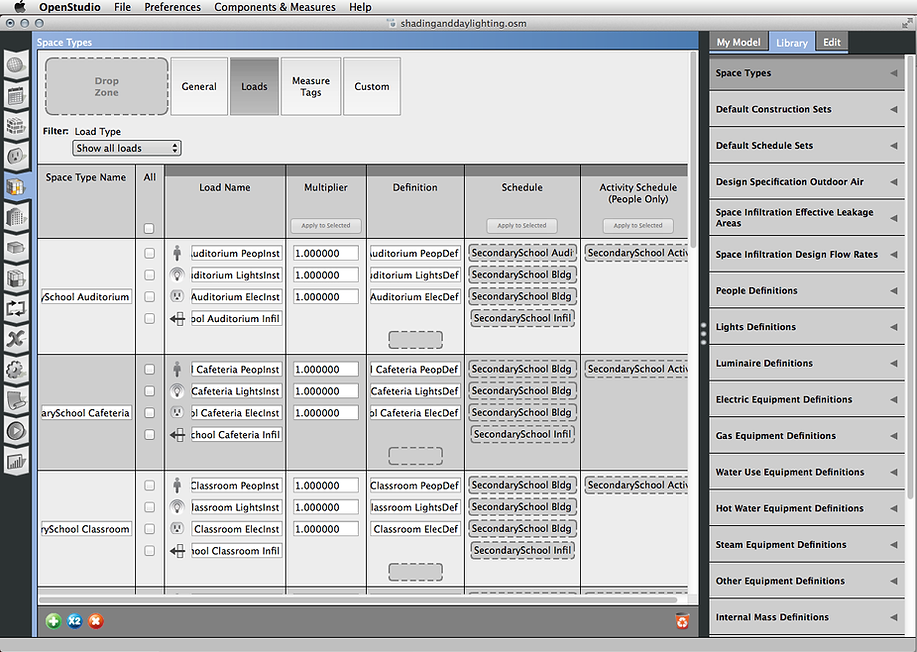
Side navigation tabs guide users through the workflow stages.
Icons
The icons to the right are examples of the many icons created to represent different components for use on the systems tab.

The Parametric Analysis Tool (PAT)
Below is a view of PAT. On this first tab, users can apply measures to their building models to test the results of different energy-saving measures, such as changing the number of windows in the building. They can test out multiple scenarios to see what would work for their project.